
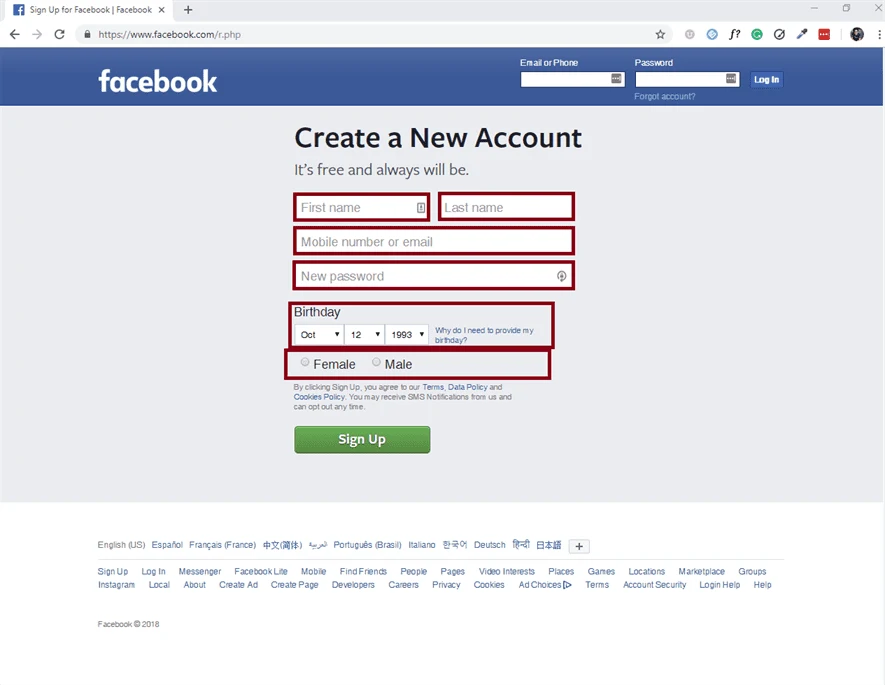
Facebook, the default social media platform. Everyone has an email account, I bet your grandmother has a Facebook account as well. Today I’m going to show you step by step how to create your own Facebook account so you can keep connected with all of your friends!
Step 1: Navigate to Google Chrome
Navigate to Google Chrome, you’ll find it somewhere towards the bottom of your screen on your taskbar.

Step 2: Navigate to the Facebook Sign Up Page
When you have gone onto Google Chrome type, www.facebook.com/r.php into the search bar and you will go straight to the Facebook Sign Up Page.

Step 3: Fill The Required Fields
Once you get onto the Facebook Sign Up Page you will be greeted with a form you have to complete. Take your time filling this form out, you wouldn’t want to make any mistakes.

Step 4: Click the “Sign Up” button
Once you are done filling out the form then you can click the green “Sign up” button.

Step 5: Verify your Email or Phone Number
Before you are able to access the Facebook Account you just created you first have to verify that you are who you say you are.

That’s it! Go out there and add all your friends and start socializing with them. I hope you found the article helpful! If you have any questions you can contact us at any time at Contact Influx Entrepreneur This has been a tutorial on how to create a Facebook account!
Turn a useful idea into a practical next step.
Use what you learned, then choose the support that fits the work ahead.
- Identify the work
Decide whether you need a new website, a focused service or ongoing support.
- Compare your options
Review scope and current charges before choosing.
- Talk through your project
Bring your website, your goal and the question you want to solve.
Older tutorials may describe earlier software or interfaces. Confirm current requirements before making changes.