
If you’re looking to install the Papier extension on Google Chrome, you came to the right place!
Down below you’ll see step by step how to install the Papier extension on Google Chrome
Step 1: Navigate to Google Chrome
Navigate to Google Chrome, you’ll find it somewhere towards the bottom of your screen on your taskbar.

Step 2: Navigate to the Chrome Web Store
When you have gone onto Google Chrome type, https://chrome.google.com/webstore/category/extensions into the search bar and you will go straight to the Chrome Web Store.

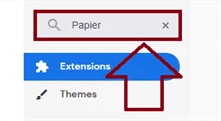
Step 3: Type “Papier” in the search bar
In the top left-hand corner, you will see a search bar that says, “Search the store”. Type “Papier” into there and then press enter.

Step 4: Click on the “Papier” extension
You will see “Papier”, click on it and you will be redirected to a page where you can install the extension.

Step 5: Click on the “Add to Chrome” button
There will be a big blue button that says, “Add to Chrome”. Click on the button.

Step 6: Click the “Add extension” button
Something will pop up on your screen asking if you want to install the extension. Click the “Add extension” button.

That was a step by step tutorial on how to install the Papier extension on Google Chrome. Down below there’s a video tutorial on what we talked about today!
Video Tutorial
In this video, you’ll learn step by step how to install the Papier extension on Google Chrome
That’s it! You just installed the Papier extension on Google Chrome. If you have any questions on what we talked about, make sure to contact us at Contact Influx Entrepreneur This has been a tutorial on how to install the Papier extension on Google Chrome!
Turn a useful idea into a practical next step.
Use what you learned, then choose the support that fits the work ahead.
- Identify the work
Decide whether you need a new website, a focused service or ongoing support.
- Compare your options
Review scope and current charges before choosing.
- Talk through your project
Bring your website, your goal and the question you want to solve.
Older tutorials may describe earlier software or interfaces. Confirm current requirements before making changes.